Site Search

Google Analyticsでサブドメインのトラッキングを行う

サブドメインのトラッキングなんて基本の基本で、いまさらなんですけど、いつも忘れるもんで…記事にすれば忘れないんじゃないかとかそういう感じです。

埋め込みコードの修正
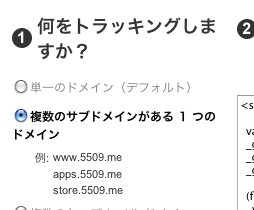
コードの発行のときに「複数のサブドメインがある 1 つのドメイン」を選択するか下記のコメント部分を追加します。

<script type="text/javascript">
  var _gaq = _gaq || [];
  _gaq.push(['_setAccount', 'UA-XXXXXXX-X']);
  _gaq.push(['_setDomainName', '.example.com']); // これを追加
  _gaq.push(['_trackPageview']);

  (function() {
    var ga = document.createElement('script'); ga.type = 'text/javascript'; ga.async = true;
    ga.src = ('https:' == document.location.protocol ? 'https://ssl' : 'http://www') + '.google-analytics.com/ga.js';
    var s = document.getElementsByTagName('script')[0]; s.parentNode.insertBefore(ga, s);
  })();
</script>

フィルタの作成と適用

ふつうは新しくプロファイルを作ると思うので、新しいプロファイルを同じドメインで作成して下図のようなフィルタを作成して適用します。
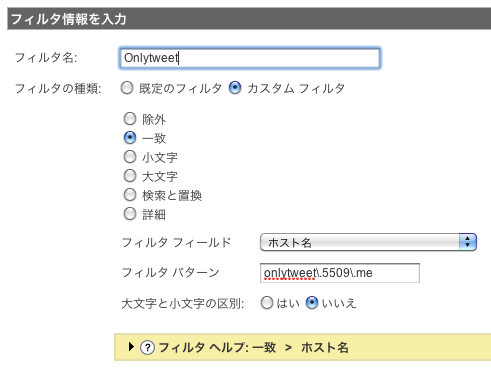
サブドメインフィルタの設定

これでもう忘れることはないでしょう。。きっと。

何か役に立つことがあったらシェアしてみてください

このエントリーをはてなブックマークに追加

Leave a comment

Comment Form
Name(required)
Email(required)
URL
Comment(required)
You can use some HTML tags for decorating texts.
(a, blockquote, ul, ol, strong, em)

Trackbacks: 0

Trackback URL for this entry
Listed below are links to weblogs that reference
Google Analyticsでサブドメインのトラッキングを行う from 5509

Author

nori
nori
- UI Engineer
Location
- 35.671643, 139.710752